
Our conflict of interest, stated up front: We make one of the tools on this list — the ToolStackly Invoice Generator, ranked #1 below. We’d rather name that than hide it.
How we tested: Every tool here was judged against the same five criteria — (1) a genuinely free tier, not a limited trial; (2) no signup required to create and download an invoice; (3) a clean, print-ready PDF; (4) your branding on the invoice, not the tool’s watermark; and (5) honest limits on the free plan, stated where we found them. We earn nothing from any listing on this page: no affiliate links, no sponsored placements, no advertising. If a competitor’s tool fits the way you work better, take it — we’d rather you get paid on time than click our tool.
Getting paid on time is the lifeblood of freelancing — and invoice software is what makes it painless. We compared the best invoicing software for freelancers and small businesses in 2026 on free plans, features, and how fast you can send your first invoice. The seven below cover everything from a no-signup browser tool to full accounting suites — starting with our own.
Just need a printable blank? Use our free invoice template.
Quick Comparison: The 7 Best Free Invoice Generators
| Tool | Best For | Free Plan | Signup Required |
|---|---|---|---|
| ToolStackly Invoice Generator | Instant invoices with no account | Yes — completely free | No |
| Wave | Full free accounting suite | Yes | Yes |
| Zoho Invoice | A generous free tier | Yes — up to 1,000 invoices per year | Yes |
| PayPal Invoicing | Getting paid through PayPal | Free to send; payment fees apply | Yes (PayPal account) |
| Square Invoices | Sellers who invoice and accept cards | Yes | Yes |
| Invoice Ninja | Open-source enthusiasts | Yes — 5 clients, unlimited invoicing | Yes |
| Refrens | Invoicing plus extra business tools | Yes | Yes |
1. ToolStackly Invoice Generator — Our Free Pick (No Signup)
Full disclosure first: this one is ours. We built the ToolStackly Invoice Generator for freelancers who need a professional invoice right now — not after creating an account, confirming an email address, and learning a dashboard.
What stands out
- No signup, no watermark, no fees. Open the page, enter your business and client details, add line items, and download a clean PDF invoice in under two minutes.
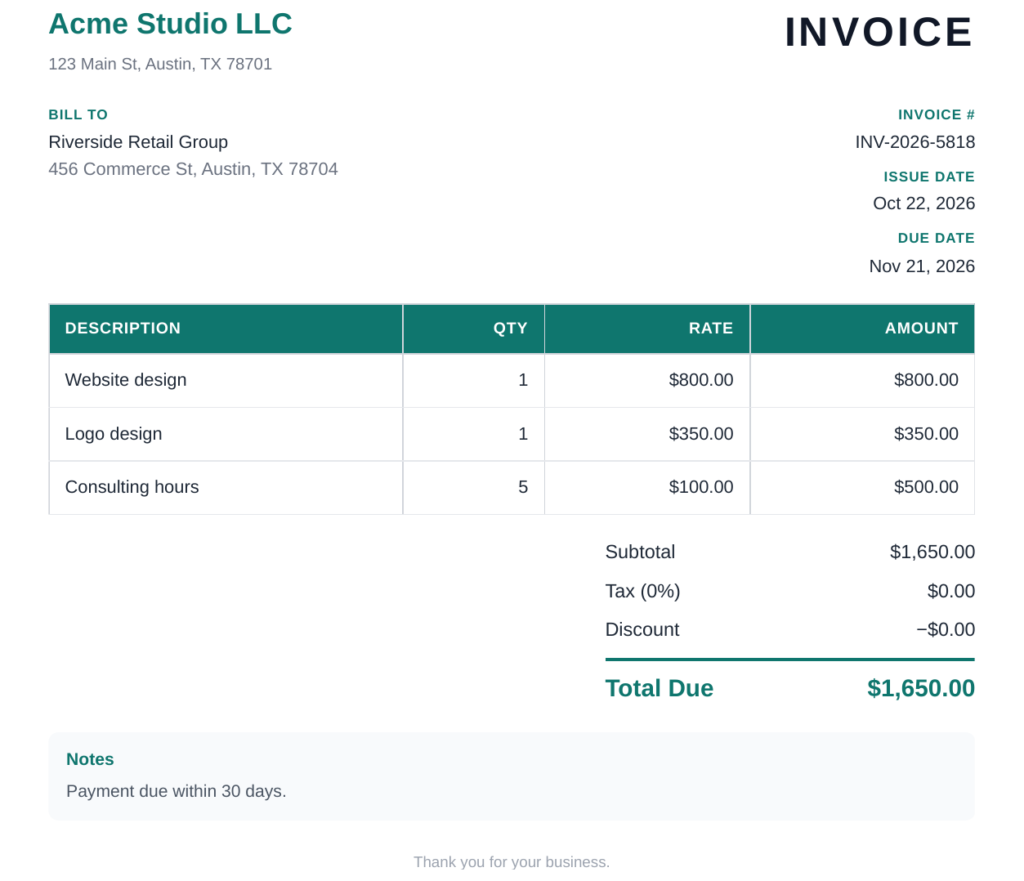
- Everything a proper invoice needs: your logo, invoice number, issue and due dates, payment terms, and totals with tax.
- Runs entirely in the browser, so it works on any device with nothing to install.
Limitations
It is deliberately focused: a fast invoice generator, not full accounting software. If you need bookkeeping, payroll, or built-in payment processing, pair it with one of the fuller platforms below.
We timed it: from blank page to downloaded PDF took 0 minutes 43 seconds in our own test — try it yourself and see if you beat us.
2. Wave — Best All-in-One Free Accounting
Wave is the rare genuinely free accounting platform. Invoicing is just one part of a suite that also covers bookkeeping and receipt scanning, which makes it ideal for small businesses that want one free home for their finances.
What stands out
- Unlimited invoices and estimates on the free plan.
- Professional templates with your logo and brand colors.
- Accept credit cards and bank payments directly from invoices (standard processing fees apply).
Limitations
You need a Wave account, and the onboarding is heavier than a quick invoice tool. It is overkill if all you want is a one-off invoice.
3. Zoho Invoice — Best Generous Free Tier
Zoho Invoice offers one of the most generous free plans in the business: up to 1,000 invoices per year. It is polished, reliable, and part of the wider Zoho ecosystem, so it grows with you.
What stands out
- 1,000 free invoices per year — more than most freelancers will ever need.
- Automated payment reminders, recurring invoices, and time tracking.
- A client portal where customers can view and pay invoices online.
Limitations
Requires a Zoho account, and some advanced features and integrations are reserved for paid plans.
4. PayPal Invoicing — Best If Your Clients Already Use PayPal
PayPal Invoicing lets you create and send invoices from your PayPal account or the mobile app. If your clients already pay through PayPal, this removes all friction: they get an email, click, and pay.
What stands out
- Free to create and send invoices — you only pay standard PayPal transaction fees when you get paid.
- Automatic reminders and partial-payment support.
- Clients can pay by card or PayPal balance.
Limitations
Everything lives inside PayPal’s ecosystem, and transaction fees apply to every paid invoice. Customization is limited compared with dedicated invoicing tools.
5. Square Invoices — Best for Sellers Who Invoice and Take Cards
Square Invoices is a strong pick for freelancers and small businesses that also sell in person or online. Invoices, estimates, and card payments all live in one free Square account.
What stands out
- Free plan with unlimited invoices, estimates, and contracts.
- Clients can pay online by card, Apple Pay, or Google Pay.
- Automatic reminders and real-time tracking of viewed and paid invoices.
Limitations
Requires a Square account, and card processing fees apply per payment. It works best for businesses already in the Square ecosystem.
6. Invoice Ninja — Best for Open-Source Fans
Invoice Ninja is an open-source invoicing platform used by more than 200,000 businesses. Its free-forever plan covers freelancers with a small client roster, and self-hosting is an option for the technically inclined.
What stands out
- Free plan with 5 clients and unlimited invoicing, quotes, and proposals.
- Dozens of payment gateway integrations.
- Self-host option for full data control.
Limitations
The free plan caps you at 5 clients, and the interface feels more utilitarian than some competitors. Self-hosting requires technical setup.
7. Refrens — Best Bundled Business Tools
Refrens bundles invoicing with extras like lead management, quotations, and expense tracking. It serves businesses in 170+ countries, including the US, and its free tier is genuinely usable.
What stands out
- Free invoicing with professional templates and recurring invoices.
- Built-in extras: quotations, purchase orders, and expense tracking.
- Multi-currency support for international clients.
Limitations
Requires an account, and the platform’s roots are in the Indian market, so some defaults (like tax labels) may need adjusting for US users.
How to Choose the Right Free Invoice Generator
The “best” tool depends on how you work. Ask yourself:
- How many invoices do you send? A handful a month? Any free tool works. Hundreds? Check the free plan’s limits — Zoho’s 1,000 invoices per year is the most generous.
- How do clients pay you? If they pay by card, pick a tool with built-in payment processing (Square, PayPal, Wave). If they pay by bank transfer, a simple PDF from ToolStackly may be all you need.
- Do you need accounting too? If yes, Wave gives you bookkeeping alongside invoicing at no cost.
- How much does branding matter? All the tools above support logos, but dedicated platforms offer more template control.
- Do you hate signups? For a one-off invoice, nothing beats a tool that works instantly in the browser — try ours first.
Frequently Asked Questions
Are free invoice generators really free?
Yes — the tools in this list all offer genuinely free tiers or are completely free. The catch is usually scope: free plans may limit the number of clients or invoices, charge processing fees when clients pay by card, or reserve advanced features for paid upgrades. Creating and downloading invoices costs nothing.
What should a professional invoice include?
At minimum: your business name and contact details, the client’s details, a unique invoice number, the issue date and payment due date, an itemized list of goods or services with amounts, the total due (including tax), and your accepted payment methods. Every tool on this list covers these fields.
Do I need an account to use a free invoice generator?
Not always. ToolStackly’s invoice generator works instantly with no signup. Most full-featured platforms (Wave, Zoho, Square) do require a free account, since they store your invoices, clients, and payment history.
Can a free invoice generator help me get paid faster?
Absolutely. Professional-looking invoices with clear due dates get paid sooner, and tools with automated reminders and one-click online payment remove the friction that delays payment. Sending the invoice the same day you finish the work matters more than which tool you use.
Are free invoice tools safe for my business data?
The established tools on this list (Wave, Zoho, PayPal, Square) use bank-grade encryption and are trusted by millions of businesses. For maximum privacy with one-off invoices, a no-signup browser tool means your data never sits on someone else’s server at all.
Conclusion: Send Your First Invoice Today
You don’t need expensive software to bill like a pro. Whether you want a full free accounting suite like Wave, a generous free tier like Zoho Invoice, or simply the fastest path from blank page to finished invoice, there’s a free option on this list that fits.
If you just need a polished invoice right now — no account, no fees, no waiting — try the ToolStackly Invoice Generator and send your first invoice in the next two minutes.
Tools mentioned in this guide: freelancer payment fee calculator.